Step 4: Advanced columns
Template columns that derive new data from existing metadata
The columns in step 3 were simple mappings: FFF gets a value from AO3, Calibre stores it in a column. Template columns work differently: they calculate their value from other columns every time they’re displayed, using a small expression or program. Change the underlying data and the template column updates automatically.
All three columns in this step use the Column built from other columns type in Calibre.
Creating a template column
In Preferences → Add your own columns, click Add custom column. Set the column type to Column built from other columns. A template field appears at the bottom of the dialog — this is where your code goes. You can also click the editor button to open a larger editing window with a live preview.
Code Editing tips
Creating and editing within Calibre's "add column" interface is a pain, so I suggest to keep text files with your templates and you copy and paste them in calibre. You can test your templates through Calibre preferences-->Tempalte functions, where you can paste in your code and see any errors, saving you calibre restarts.
Short wordcount
Do you need to know at a glance whether a fic is 15341 or 15349 words? No, you need a rounded number.
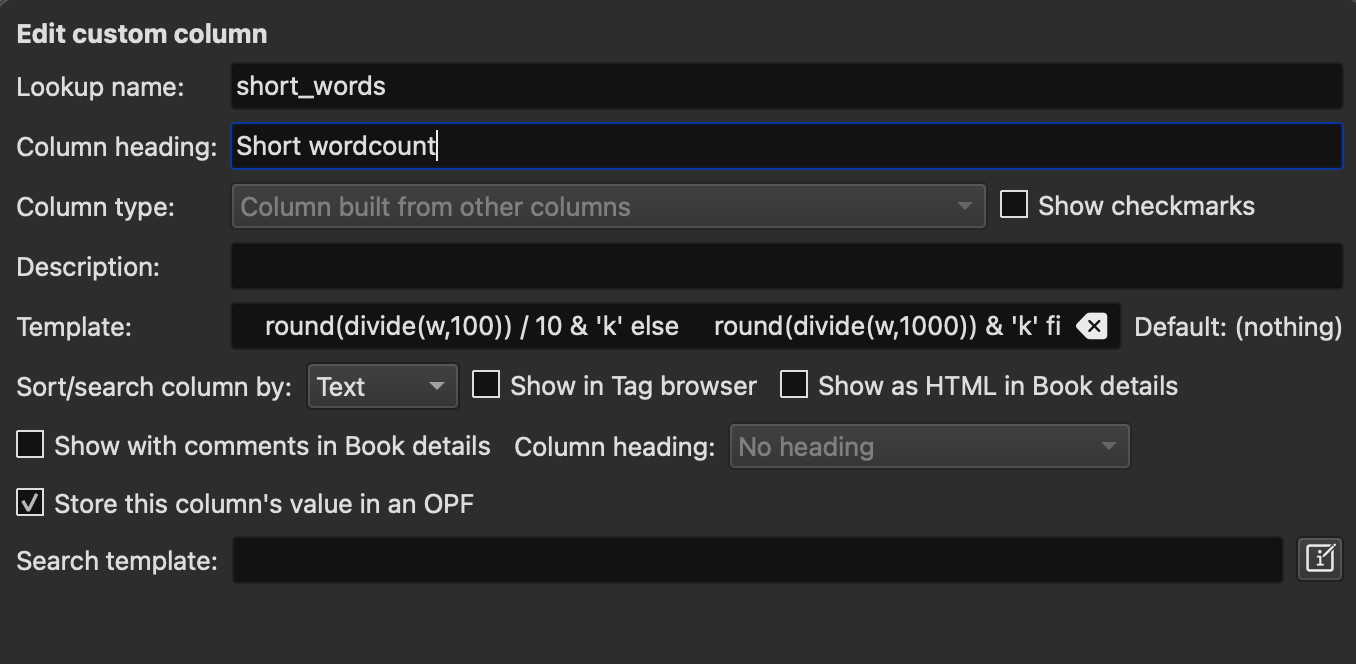
Column name: Short wordcount — Lookup name: short_words — Type: Column built from other columns
This column reads the raw word count from #words and formats it for display: under 1000 words shows as-is with a “w” suffix, anything larger is rounded and shown in thousands.
program:
w = field('#words');

if w == '' then
    ''
elif w <# 1000 then
    w & 'w'
elif w <# 10000 then
    round(divide(w,100)) / 10 & 'k'
else
    round(divide(w,1000)) & 'k'
fi
A 750-word fic shows as 750w. A 34,000-word fic shows as 34k. A 6,500-word fic shows as 6.5k.
Short status
Quickly check if a fic is completed
Column name: Short status — Lookup name: short_status — Type: Column built from other columns
Converts FFF’s status values into compact display text.
program:
s = lowercase(field('#status'));
if contains(s, 'complet', '1', '') then return '✔'
elif contains(s, 'progress|wip', '1', '') then return 'WIP'
else return field('#status')
fi
“Completed” becomes ✔, anything in-progress becomes WIP. The else branch passes through any unexpected value rather than swallowing it silently.
Genre
You want to know what a fic is about, and you don’t want to display a fic’s 25 tags on the cover. So generate Genre tags:
Column name: Genre — Lookup name: genre — Type: Column built from other columns, behaves like tags
This column scans the fic’s tags and checks them against a list of genre keywords. Each check is independent — a fic can have multiple genres.
program:
# Read tags and convert to lowercase for case-insensitive matching
tags = lowercase(field('tags'));

result = '';

# -----------------------------------------------
# EDIT THIS SECTION: add, remove, or modify genres
# Pattern: look for any of these keywords in the tags,
# and if found, add this label to the result.
# Use | to add more keywords to an existing genre.
# A fic can match multiple genres simultaneously.
# -----------------------------------------------

result = list_union(result, test(contains(tags,
    'fluff|domestic|domestic bliss|soft|slice of life|comfort',
    '1', ''), 'Fluff', ''), ', ');

result = list_union(result, test(contains(tags,
    'hurt/comfort|whump|hurt|sick|illness|injury|recovery',
    '1', ''), 'Whump', ''), ', ');

result = list_union(result, test(contains(tags,
    'angst|major character death|grief|ptsd|trauma|depression',
    '1', ''), 'Angst', ''), ', ');

result = list_union(result, test(contains(tags,
    'alpha/beta/omega|omegaverse|abo',
    '1', ''), 'ABO', ''), ', ');

# To add a new genre, copy any block above and change
# the keywords and the label. Example:
# result = list_union(result, test(contains(tags,
#     'time travel|time loop',
#     '1', ''), 'TimeTrav', ''), ', ');


return result
Each block follows the same logic: look for any of these keywords in the tags, and if found, add this label to the result. To add a new genre, copy any block and change the keywords and label. To add keywords to an existing genre, add them to that line separated by |.
Which tags field?
This template reads from Calibre's standard tags field. Depending on how your FFF is configured, genre-relevant tags may instead be in a custom column. If the column comes up empty, check which column your freeform tags are landing in and update field('tags') accordingly.
Tag flags
You can use the genres flag to make any tag show up in your cover. For example, I tag fics recommended by fandom friends. I then show that in my genre column and my covers with a single added line.
Add this to your genre template, anywhere in the list:
result = list_union(result, test(contains(tags,
    'recommend|recommends|recommended',
    '1', ''), '🌟', ''), ', ');
A fic tagged “Recommended” in your library will show 🌟 alongside its other genre tags.
You can also do something like:
result = list_union(result, test(contains(tags,
    'mpreg',
    '1', ''), '🫃', ''), ', ');
Short ship
You want to know the fic’s ship- and preferrably without displaying “Jesper James Johnsson (Some fandom)/Martin Moriarty Martinsson” on every cover.
Column name: Cover ship tags — Lookup name: short_ships — Type: Column built from other columns, behaves like tags
This column reads the relationships from #ship, keeps only the first romantic one (containing a /), checks them against a list of known ships, and returns short names for the cover.
program:
# Read the relationships column
ships = field('#ship');

# If there are no slash ships at all, return 'Gen' and stop
if !contains(ships, '/', '1', '') then return 'Gen' fi;

# Find the first slash relationship, wherever it is in the list
s0 = re(ships, '^(?:[^/,]+,\s*)*([^,]+/[^,]+)(?:,.*)?$', '\1');

# Safety check: if the regex found nothing, return 'Gen'
if !contains(s0, '/', '1', '') then return 'Gen' fi;

# Lowercase for case-insensitive matching
lc = lowercase(s0);

# -----------------------------------------------
# EDIT THIS SECTION: add your ships
# Pattern: if the ship name contains this text, return this label
# Use | to match multiple variants of the same ship name
# -----------------------------------------------

if contains(lc, 'sherlock holmes/john watson|sherlock/john', '1', '') then return 'Johnlock'
elif contains(lc, 'shane hollander/ilya rozanov', '1', '') then return 'Hollanov'

# Add more ships here following the same pattern:
# elif contains(lc, 'character a/character b', '1', '') then return 'ShipName'
# "a/b|b/a" means a/b OR b/a
# -----------------------------------------------

# If the ship isn't in the list above, return the raw name trimmed to First/Last
else return re(s0, '(?i)([^/]+)/([^/]+)', '\1/\2')
fi
Adding your ships: each elif block checks whether a ship name appears in the tag and returns a short label. Add as many as you like — the pattern is always the same. Anything not in the list falls back to a trimmed version of the raw tag. If no slash relationship is found, “Gen” is set.
A note on ordering: Calibre sorts the #ship column alphabetically, which means this template may not always pick up the author’s intended primary ship for fics with multiple pairings — it gets the alphabetically first slash ship. For most single-pairing fics this doesn’t matter. Step 5 covers a more robust approach using personal.ini to preserve author order, but it comes with considerably more setup.
Using ship tags for covers
Once this column is working, you can use it in generate_cover_settings in FFF's personal.ini to assign per-ship cover templates — for example, a dedicated cover for your OTP. Add a line like ${#short_ships} => Johnlock => Classics Johnlock above your fandom rules. First match wins, so ship-specific rules should come before fandom rules.